Pages

Ads 468x60px

Thursday, March 15, 2012

Week 4's homework

After some research and many try and error, at last i've solve the previous problem, Alhamdulillah.. But now i've new problem :( The problem is during setup connection. When testing to the data base there is an error :


HTTP error 405 Method Not Allowed

The same problem facing with my colleague, Pn Masni.Hope we'll solve this problem ASAP. Got to go rest first n see u then..


---------------------------------------------------------------------------------------


19 March 2012 :


Hasil bertapa sejam di lab hari ni, alhamdulillah most complete asp homework. Cuma tinggal buat repeatation view the records.. will be edit again.


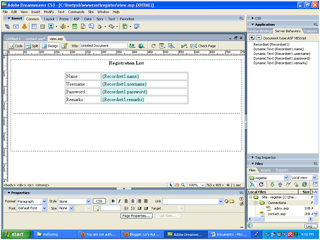
database connection success

 registration page success

recordset connection success

viewing and entering registration form at internet browser

After keep trying to settle all the problems database connection and after i met with lab technicians, Mr Ali still cannot settle it in Windows 7. My OS is Windows 7 Ultimate cannot support the applications, but only Windows 7 Professional can support them. If i want to do in my laptop, i must be either to convert to Windows XP Pro Win 7 Pro.

--------------------------------------------------------------------------------------
22/3/2012


Alhamdulillah... Finally done the 'simple homework' from Dr Zaida. Look 'simple', but for those not familiar with web development it's sooooooo hard :D (refer to myself also). During completing this homewrok i've formatted my laptop to Win XP Pro. Its 2 times formatted within 24 hours (after a decad not doing his job). TQ my fren, Fadlee for remind n refresh me back how to do it!  Berbaloi kan Pn Masni g disscussion this homework with my kids along together hehehe.


Taraaaaa it's the outcome from our disscussion :

 Interface for input data


Interface for output data

Homework was sent via e-learning UTM as below :


Week 4 : Installing IIS, Using ASP in Dreamweaver CS3 connect to MS Acces as database.

بسم الله الرحمن الرحيم

Today lesson is quiet tough to me to catch up all in fast way, but i'll try to be fast learner,insyaAllah.. It's may be some problem with my lappy, cannot configure with some application during setup the asp file in dreamweaver to IIS. The problems is, i can't save asp file in wwwroot folder.. Dr Zaida said, it's cause of windows security setting. After several minutes try to solve the problem i decide to forget for a while about my lapy problem and convert to lab pc. Alhamdulillah.

There is the steps to install IIS in windows 7 :

1. Click Start > Control Panel to open Windows Features.
Control Panel pada Start Menu Windows 7
Control Panel in Start Menu Windows 7

2. Open control panel and select program and feature
Control Panel Windows 7
Program and Features

3. Select Turn Windows Feature On Or Off and select folder IIS Management Console and World Wide Web Service
Windows Features
Windows Features

4. Click OK and windows will install the features.
Proses Instalasi IIS pada Windows 7
Installation process IIS in Windows 7

5. To make sure that the IIS is successfull installed in your computer, type http://localhost/ in your web browser. You can get like this if it success. Congratulation!!!
Localhost dibuka dengan IE7
 ** It's just a bit off our class today.. i'll continue later..

Friday, March 9, 2012

Week 3 : Hyperlink and ASP

بسم الله الرحمن الرحيم

Dr Zaida was start our class by describing us the filing system in web development. Every part or chapter must have their own folder. Every folder must have their index.html file refer to the first page every path. These filing system very important to help us easier to maintain the web for next time.

In this week we also learn how to make the hyperlink. There are 4 type of hyperlink in web designing:
  1. from one html file to other html file
  2. from html file to other homepage
  3. in different location within a html file
  4. to email
 Before end of class, we also expose to ASP and PHP. Getting starterd a dynamic page, need to install testing server in computer to run ASP or PHP. ASP is using IIS for testing server, MS Access for database running Windows operating system. While PHP running in Linux, Unix also Windows operating system using MySQL as data base and Apache as testing server. Further information will be disscuss on next week. The most important thing is to install  XAMPP first to get all the testing server. Good Luck!!!

Saturday, March 3, 2012

Week 2 Reflection for 2nd class of MPT1193 on Thu 1 Mac 2012

بسم الله الرحمن الرحيم

Week 2 : This week we've expose to Web Evolution. It was very interesting to know everything about web developing. Web evolution was started with Web 1.0, Web 2.0 to Web 3.0 from 1995 untill now.. It's predicted going to be Web 4.0 soon. How fast it was growth... it's a technology and knowledge. I found this interesting video about web evolution seem like our lecturer, Dr Zaida have tough in class.


On 2nd half of our class, we have expose to web developing using Adobe Dreamweaver CS3. It's such as a userfriendly software to create and also editing web page. Once time ago i just know how to develop web site using HTML code only even though on that time already have MS Frontpage as drag and drop web developing software ... That's time i feel so stress with all coding type in notepad then browse it in Netscape Navigator. Whether you're looking to improve your web design skills with a new program, or you're trying to find the best program to start with, using Adobe Dreamweaver more easier than other.

DW Interface

So many tips in web designing we have learnt today. 
  • For easier designing, we have to put all the text and picture in the table. So that, our web page look well organize, just like using a cell in excel we can simply to merge and split the cell.
  • All media in web page must put all together into one folder before publish or hosting.
  • The main page of our web site must be named by main.html or index.html or default.html for security purpose.
  • When named the web page, make sure the extention of file name is consistant. Eg : *.html or *.htm.
  • Template for web design is can't copyright. So that, if you like the others web template design, we can save and edit it.. (i'm very happy with this point coz i'm not a creative person to design new one hehehe <3)
  • Don't resize your picture. If u want it, u can edit it properly using Adobe Photoshop.
Happy and enjoy web designing... InsyaAllah